Amphetamine and Waindow for Mac

Amphetamine goes much deeper on keeping a Mac awake. Waindow does more around it.

Choose Amphetamine if you want a dedicated keep-awake tool with automatic Triggers and specialized session controls. Choose Waindow only if manual sleep prevention is enough and window layouts, memos, capture, and focus tools belong in the same menu-bar app.

Compared against Amphetamine's official App Store listing · Reviewed 2026-08-01

Side by side

Dedicated depth or a smaller tool inside a wider kit?

Waindow is not a drop-in Amphetamine replacement. Amphetamine is the stronger keep-awake product; Waindow is the different fit when Keep Awake is one part of a window-centered workflow.

Primary job
Amphetamine: Keep a Mac awake with deep manual controls and automatic condition-based Triggers.
Waindow: Arrange windows and provide a smaller manual Keep Awake tool beside other local work utilities.
Session timing
Amphetamine: Indefinite, timed, until a time, while a file downloads, or while an app runs.
Waindow: Indefinite, a 1–10,080 minute timer, or until a chosen clock time. It does not include app- or file-based sessions.
Automatic conditions
Amphetamine: Triggers can react to apps, displays, devices, power, networks, audio, drives, CPU load, idle time, and other listed criteria.
Waindow: No condition-based Triggers. Sessions start only when the user or an enabled typed automation requests one.
During a session
Amphetamine: Can manage display sleep, screen saver, closed-display behavior, mouse movement, locking, Drive Alive, and battery-based ending.
Waindow: Chooses whether the display may sleep and can optionally protect a closed-display session on a supported portable Mac in the direct build. It does not provide Amphetamine's other specialized controls.
Automation
Amphetamine: Built-in Triggers, hotkeys, and documented AppleScript support.
Waindow: Optional Shortcuts, MCP, and typed CLI actions can start normal Keep Awake sessions. Closed-display protection must be started in Waindow's panel.
Beyond Keep Awake
Amphetamine: Stays focused on keeping a Mac, display, and related session resources awake.
Waindow: Adds window layouts, Linked Resize, local window memos, long-page capture, Blackout, and a total CPU or memory menu-bar indicator.
Price and install
Amphetamine: 100% free with no ads or in-app purchases and distributed through the Mac App Store. Check its current Compatibility field for your Mac.
Waindow: Free with no account or license key, requires macOS 13.1+, and ships as one 7.77 MB direct ZIP. It is not yet Developer ID notarized, so macOS may ask you to use Open Anyway when first launching a downloaded build.
Fast decision

Which one should you install?

Choose Amphetamine if…

  • condition-based Triggers are the main reason you are here;
  • a session should follow an app, file, device, network, or power state;
  • screen saver, mouse, lock, drive, or battery controls matter;
  • you want a mature dedicated tool from the Mac App Store;
  • you prefer its Mac App Store install and broader older-macOS support.

View Amphetamine on the App Store →

Choose Waindow if…

  • manual indefinite, timed, or until-time sessions are enough;
  • the display may sleep while the Mac keeps working;
  • window layouts and Linked Resize are the larger job;
  • local window memos, capture, and Blackout replace extra apps;
  • Keep Awake is useful, but not the center of your workflow.

Keep it only if the wider toolkit earns its menu-bar space.

Actual product · No comparison mockup

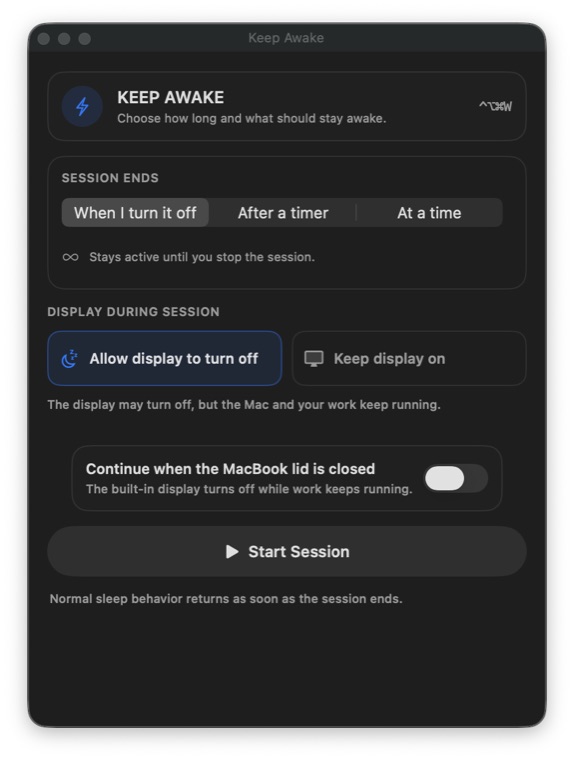
See Waindow's complete Keep Awake panel first.

This is the current Waindow 1.10.0 Keep Awake panel in English. It shows the three end choices, separate display behavior, and the direct-build closed-display option—without implying Amphetamine's deeper Triggers are present.

Try the same Waindow build
Actual Waindow 1.10.0 Keep Awake panel showing duration, display, and closed-display choices in English
Actual Waindow 1.10.0 Keep Awake panel · English interface · 40 languages

Sources and boundaries

Verify the dedicated tool at its source.

Amphetamine facts

Session types, Triggers, specialized controls, free status, and system requirement come from its current official App Store listing.

Official App Store listing →

Waindow boundaries

Waindow has no Amphetamine-style Triggers, app- or file-based sessions, Drive Alive, mouse movement, screen saver or lock control, or battery-based auto-end. Its source is private and the current direct build may ask you to use Open Anyway when first launching a downloaded build.

Read the verified Keep Awake guide →

Waindow is not affiliated with Amphetamine or its developer. Product names belong to their respective owners.

A wider toolkit, not deeper Keep Awake

Try Waindow only if the work around sleep prevention is the point.