Focus the content you want
Use a supported browser, Preview, or a standard scrollable view. Waindow resolves the focused window and stops instead of guessing when the target is ambiguous.
Scrolling screenshot for Mac
Focus a supported scrollable window and press one shortcut. Waindow captures verified steps, stitches them locally, and tells you when the result may need a closer look.
Free · No account · macOS 13.1+ · Apple Silicon + Intel
Three steps
The default safety limits are 30 scroll steps and 60,000 pixels of output height. You can set 10–100 steps and 10,000–200,000 pixels in Settings when the page needs a different boundary.
Use a supported browser, Preview, or a standard scrollable view. Waindow resolves the focused window and stops instead of guessing when the target is ambiguous.
Screen Recording is requested only when you ask to capture. Waindow finds a reliable content region, captures it, and advances through verified scroll steps.
The result appears locally. Save it, copy it, pin it above your work, or extract editable text on device. Waindow does not upload the image.
Actual product · No mockup
This is the actual app menu—not a staged capture result. It shows Full Page Capture and its ⌃⌥S shortcut in English.
Download the same app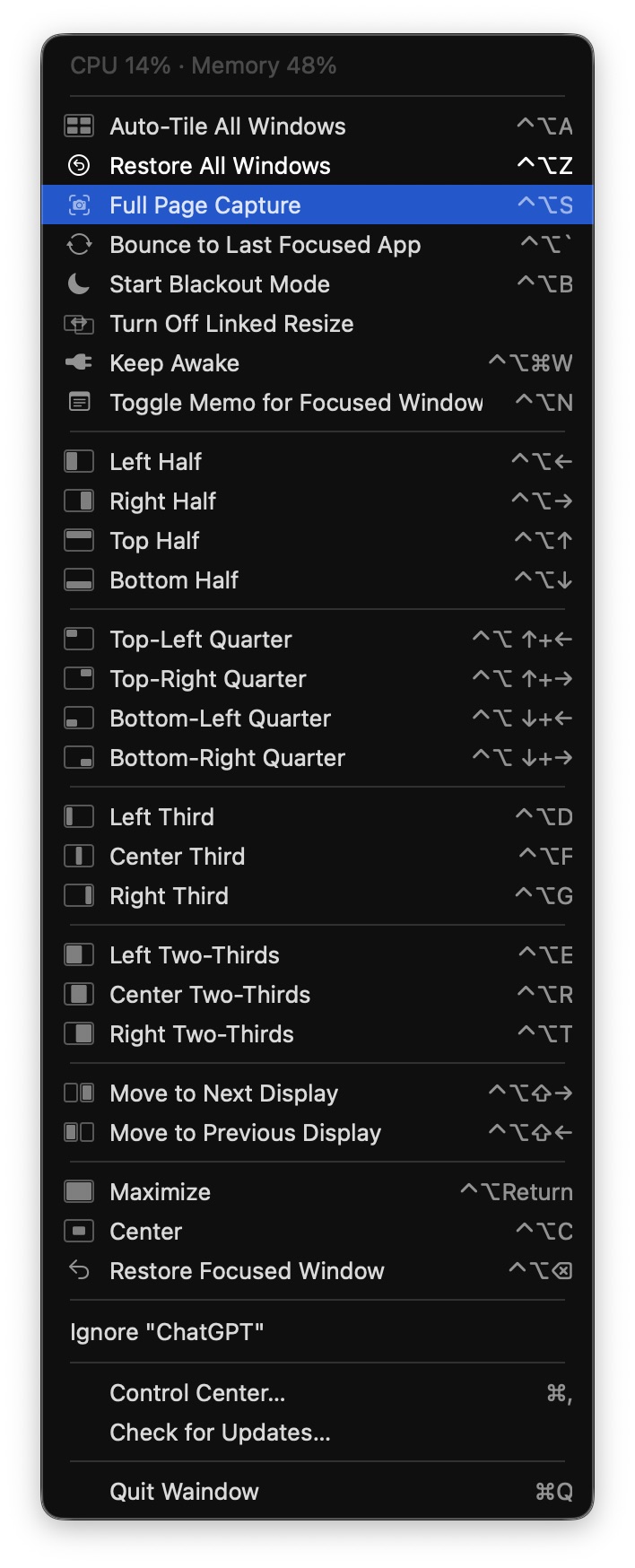
Warnings are part of the result
Waindow checks whether the page moved and whether adjacent frames can be joined with confidence. It surfaces a warning instead of silently presenting a questionable capture as complete.
Honest fit
Try the current build